Designing Web3 Interfaces: CSS Best Practices for Crypto Wallet Connect Buttons
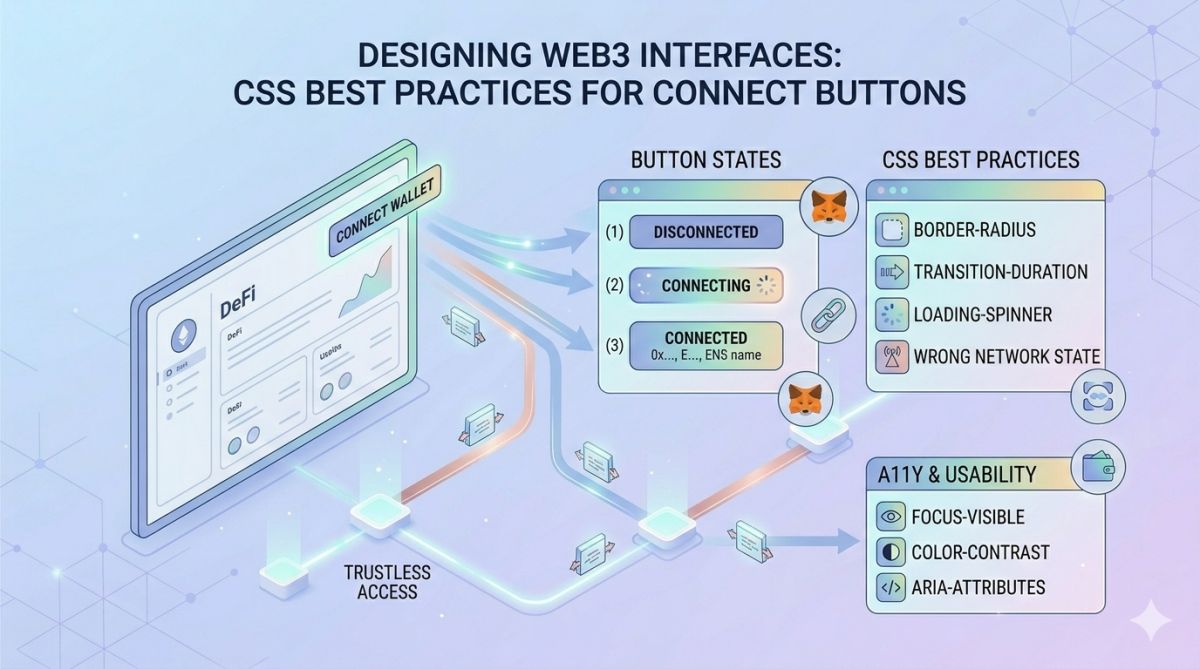
The first interaction any user has with a decentralized application is the "Connect Wallet" button. If this crucial UI element feels clunky, unresponsive, or visually broken on mobile devices, trust evaporates instantly, and the user bounces. Building the frontend infrastructure for Zanachain taught me that Web3 design is not just about flashy gradients; it is about creating seamless, high-conversion touchpoints that reassure users before they sign cryptographic transactions. In this deep dive, I will share the exact CSS architectures, strict mobile-first constraints, and interactive states required to design wallet connection interfaces that look professional, function flawlessly across all devices, and maximize your dApp's onboarding conversion rate.
The Psychology of the Connect Button
In the traditional Web2 world, logging in is a low-stakes action. You enter an email and a password. In the Web3 ecosystem, clicking "Connect Wallet" is a high-stakes action. The user is granting a third-party application permission to view their cryptographic addresses and, potentially, interact with their financial assets. This inherent anxiety means your interface must exude absolute professionalism and security.
If your CSS is sloppy—if the button text overflows its container on a smaller screen, if the hover state is jittery, or if the modal popup lacks a proper z-index and overlaps with your site's header—the user subconsciously registers your dApp as "unsafe." Exceptional CSS is not just about aesthetics in Web3; it is the visual foundation of trust.
The 550px Rule: Mastering the Mobile-First Modal
A fatal mistake many blockchain developers make is designing their decentralized applications on ultra-wide desktop monitors, only to realize that 80% of their traffic comes from mobile crypto wallets. When building the core application interface or wallet selection modals, I enforce a strict maximum screen width constraint.
.wallet-modal-container {
width: 100%;
max-width: 550px;
margin: 0 auto;
border-radius: 16px;
}
Why 550px? By locking this maximum width, you completely eliminate visual discrepancies between your desktop template previews and the actual mobile output. The interface remains centered, tight, and highly legible regardless of the device. This specific constraint forces you to design clean, vertical hierarchies rather than relying on sprawling horizontal layouts that break on smartphones.
Solving the Scroll Dilemma for Wallet Templates
When a user clicks your perfectly styled button, a modal usually appears listing multiple wallet options (MetaMask, Trust Wallet, Pi Wallet, WalletConnect). If you have dozens of supported wallets or template options, you must use a scrollable container. However, navigating these containers often reveals a massive oversight in cross-device compatibility.
A common pitfall I have encountered is creating horizontal or vertical template lists that swipe perfectly on touchscreens but fail completely when a user tries to scroll them using a desktop mouse. To ensure a frictionless experience, you must combine native CSS properties with seamless interaction design. Use overflow-y: auto; and overscroll-behavior: contain; for vertical lists, ensuring that scrolling inside the modal does not accidentally scroll the background body of the website. Furthermore, ensure that any horizontal template carousels are accessible via mouse-dragging or visible scrollbars, not just touch events.
Web2 vs. Web3 Button Requirements
To highlight the architectural differences, let's compare standard UI buttons with Web3-specific connection buttons:
| Design Element | Standard Web2 Button | Web3 "Connect Wallet" Button |
|---|---|---|
| State Management | Default, Hover, Active | Default, Hover, Loading (RPC Wait), Connected, Error |
| Data Display | Static Text (e.g., "Submit") | Dynamic Truncated Address (e.g., "0x1A...3fB") & Balance |
| Visual Feedback | Simple color change | Network indicators (Green for Mainnet, Red for wrong chain) |
| Iconography | Optional generic icons | Mandatory SVG wallet logos for rapid recognition |
Designing the "Loading" and "Error" States
When a user attempts to connect their wallet, your PHP backend or JavaScript provider must query a decentralized RPC node. This process can take anywhere from a few milliseconds to several seconds depending on network congestion. If your button simply sits there doing nothing after being clicked, the user will assume the app is broken and click it repeatedly, causing transaction spam and fatal errors.
You must implement a robust Loading State using CSS animations. A simple infinite rotation keyframe applied to an SVG spinner inside the button provides immediate visual feedback. Similarly, if the user rejects the signature request in their wallet, your CSS must dynamically shift to an Error State, gently shaking the button or turning the border red, accompanied by a clear, localized error message.
Best Practices for Typography and Truncation
Once the wallet is successfully connected, the standard practice is to replace the "Connect" text with the user's public wallet address. However, a standard blockchain address is 42 characters long. If you attempt to display this entire string on a mobile device, your layout will shatter.
You must use CSS and JavaScript to truncate the address gracefully. Using CSS properties like text-overflow: ellipsis; is helpful, but the best approach is to display the first 4 and last 4 characters of the address (e.g., 0x4B2...a9F1) using a monospaced font. Monospaced fonts ensure that the button width remains absolutely stable regardless of which hexadecimal characters are generated, preventing your header layout from violently resizing when different users log in.
Conclusion: The Interface is the Product
In the decentralized web, the underlying smart contracts handle the logic, but the user interface handles the human. Designing an exceptional Web3 interface requires a meticulous understanding of CSS, a religious dedication to mobile responsiveness, and an empathetic approach to user anxiety. By enforcing strict constraints like the 550px max-width, ensuring flawless cross-device scrolling for your templates, and designing comprehensive interactive states, you elevate your dApp from a simple script into a professional, trustworthy financial tool.